
Turning a written idea into a video used to mean opening an editor, finding footage, recording a voiceover, adding captions, and rebuilding the same piece for every platform. AI-assisted tools can shorten that process, but they do not remove the decisions that make a video useful.
InVideo AI is designed for people who want to move from a prompt or script toward a workable video draft without assembling every scene manually. It can help with scripting, visual generation, stock media, voice, captions, and editing inside one workspace. The practical question is not whether it can generate a video. It is whether its workflow matches the type and volume of content you actually produce.
Quick take: InVideo AI makes the most sense for creators, marketers, freelancers, and small teams that need to turn scripts or existing ideas into social videos quickly. It is less compelling for editors who need exact control over every cut, teams with strict production pipelines, or anyone expecting a first generation to be ready without review.
The strongest use case is draft acceleration. Let the system assemble a starting point, then check the script, replace weak visuals, correct captions, adjust pacing, and export the formats the campaign actually needs.
What InVideo AI is
InVideo describes its current product as an AI video creation platform with agents and access to multiple video, image, and audio models. A user can begin with an idea, prompt, or script, generate a draft, and continue refining the result through editing tools.
This is broader than a simple text-to-video button. The platform combines generation with a timeline editor, stock media, audio controls, and collaborative features. Which models and capabilities are available depends on the selected plan.
That breadth is useful, but it also means usage is not always predictable from video length alone. AI work consumes credits, and different models, resolutions, durations, and settings can use different amounts. Manual timeline editing itself does not consume AI credits, according to the current InVideo documentation.
Who it is useful for
- Content teams
Repurpose articles, webinar notes, product explanations, or campaign briefs into short video drafts without starting with an empty timeline. - Freelancers and creators
Produce regular social clips when speed and consistency matter more than frame-level custom animation. - Marketers
Test several hooks, formats, and aspect ratios before investing additional editing time in the strongest concept. - Small teams
Keep scripting, draft creation, review, and manual polishing in one shared workflow.
It is not limited to people with no editing experience. An experienced editor may use it for rough assemblies, concept variations, captions, or stock-based drafts, then finish the work manually.
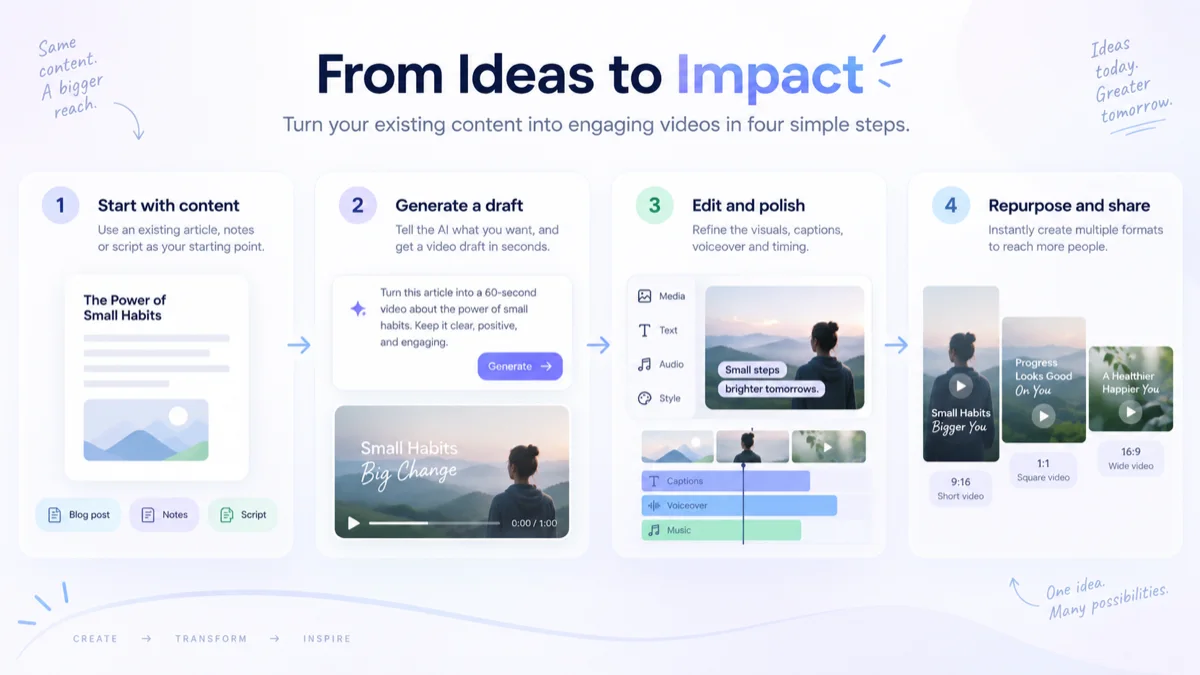
How the workflow works
- Define the brief.
Describe the audience, message, tone, length, format, and desired action. - Generate a draft.
Let the platform propose a script, scenes, visuals, voice, and pacing. - Review the claims.
Correct facts, names, pronunciation, captions, and any visual that implies something inaccurate. - Edit deliberately.
Shorten weak sections, replace generic media, balance audio, and make the first seconds earn attention. - Adapt and export.
Create the aspect ratios and caption treatment required by each destination.
A useful companion process is this practical guide to turning a blog post into a short video. It focuses on the editorial decisions that still matter regardless of which tool creates the first draft.
Key features that affect the decision
Practical use cases
Good fit
Convert a tutorial article into a 45-second summary with one problem, three steps, captions, and a link back to the complete guide.
Good fit
Build several opening hooks for the same campaign, compare them internally, and polish only the version that communicates the idea most clearly.
Poor fit
Expect the platform to produce a legally accurate product demonstration without supplying approved claims, brand assets, and human review.
Poor fit
Use a generic prompt for a high-stakes brand film that requires precise art direction, continuity, custom motion design, and exact color control.
How pricing and credits work
InVideo currently offers a free way to explore the platform and several paid levels. The free allocation is limited, while paid plans provide larger credit allowances, broader model access, more storage, stock-media allowances, and different collaboration limits.
The plan name is only part of the cost. AI credits are consumed according to the work performed. Model choice, resolution, duration, audio generation, and other settings can change the amount used. Monthly plan credits reset and do not roll over, while separately purchased extra credits follow their own validity rules.
Do not estimate the cost of a content calendar from one successful generation. Run two or three representative projects, note the credits used after revisions, and include failed or discarded generations in the calculation.
The public plan structure and allowances can change. Check the official pricing page and the usage estimate shown inside the product before choosing a subscription.
Pricing model checked against official InVideo documentation: September 17, 2026.
Advantages and limitations
- Where it helps
- A draft can begin from a plain-language brief.
- Generation and manual editing live in one workspace.
- Multiple media models broaden the available approaches.
- Captions, voice, stock media, and formats can be handled in the same process.
- Teams can review a concrete draft instead of discussing an abstract idea.
- Where caution is needed
- Credit usage can rise across revisions and model changes.
- Generated facts, scenes, captions, and pronunciation require review.
- Generic briefs often produce generic videos.
- Exact brand work may still need dedicated editing and design tools.
- Free access is useful for exploration, not proof that a paid production plan will fit.
Who should consider it
Consider InVideo AI if you already have ideas, articles, scripts, or campaign briefs but lack the time to assemble every first draft manually. It is especially relevant when the output is short, repeatable, and destined for several social formats.
You may not need it if your current browser-based editor already covers simple cuts and captions, if you publish video rarely, or if every project requires custom footage and frame-accurate finishing. A traditional editor may also be the better center of the workflow when several specialists exchange project files and follow an established post-production pipeline.
The useful comparison is not AI versus no AI. It is the total time and revision cost of your present workflow versus a generated draft that still needs supervision.
A practical example workflow
Source: a 1,200-word article explaining five ways to reduce meeting follow-up delays.
- Select one promise: leave every meeting with an owner and next action.
- Write a 90-word script with a hook, three steps, and one closing action.
- Ask for a 45-second vertical draft aimed at small-team managers.
- Replace any visual that suggests a different product or workplace than the script describes.
- Check names, numbers, captions, pronunciation, music level, and safe zones.
- Export the vertical version, then adapt the composition for square or wide use instead of stretching it.
The tool accelerates assembly. The editor still decides what the video should say, what evidence supports it, and what deserves to remain on screen.
Final assessment
InVideo AI is a practical candidate for people who publish video often enough to benefit from faster drafts but do not want generation separated from editing. Its range of models and tools creates flexibility, while the credit system makes disciplined briefing and revision important.
Begin with a real piece of content, not a demonstration prompt. Measure how many revisions it takes to reach a publishable result. Check the captions, facts, pacing, and actual credit use. That small production test will reveal more than a long feature list.
Sources and verification
- Official InVideo pricing and plan comparison
- InVideo Help Center: plans and credits
- InVideo Help Center: free access
- InVideo Help Center: AI filmmaking workflow
- InVideo Help Center: timeline editing and credit use
Product capabilities and the pricing model were checked September 17, 2026. Plans, credits, model availability, export conditions, and feature limits can change. Confirm the current terms on the official InVideo website before purchasing.
This is an editorial review based on current public documentation. It does not claim that Senatove tested every model, plan, export path, or production scenario.
FAQ
What is InVideo AI used for?
InVideo AI is used to create and edit videos from prompts, scripts, images, and other source material. It combines AI generation with stock media, audio tools, captions, timeline editing, and collaboration features. Available models and limits depend on the selected plan.
Can I use InVideo AI for free?
InVideo currently offers free access with limited credits. It can be useful for exploring the workflow, but plan allowances, export conditions, watermarks, and model access can change. Check the official pricing page before planning production work.
How do InVideo credits work?
Credits are used for AI agent work, media generation, and model-based features. Usage varies by model, duration, resolution, audio, and other settings. Manual timeline editing does not consume AI credits, while plan credits reset according to the current billing rules.
Does InVideo AI replace a video editor?
Not in every workflow. It can accelerate scripts, rough assemblies, captions, voice, and format variations, but generated facts, visuals, pacing, audio, and brand details still need human review. Frame-accurate or highly customized work may require a dedicated editor.
Does Senatove earn money from InVideo links?
Yes. The InVideo buttons on this page are affiliate links. If you make an eligible paid purchase after following one, Senatove may earn a commission at no additional cost to you. Free trial starts are not commissionable, and InVideo sets the price and purchase terms.